

Tebra Billing: Software, Services, and How to Staff the Work
Tebra billing can mean the platform's billing module or a service that works inside Tebra. This guide separates the two and explains where software ends and human billing work begins.
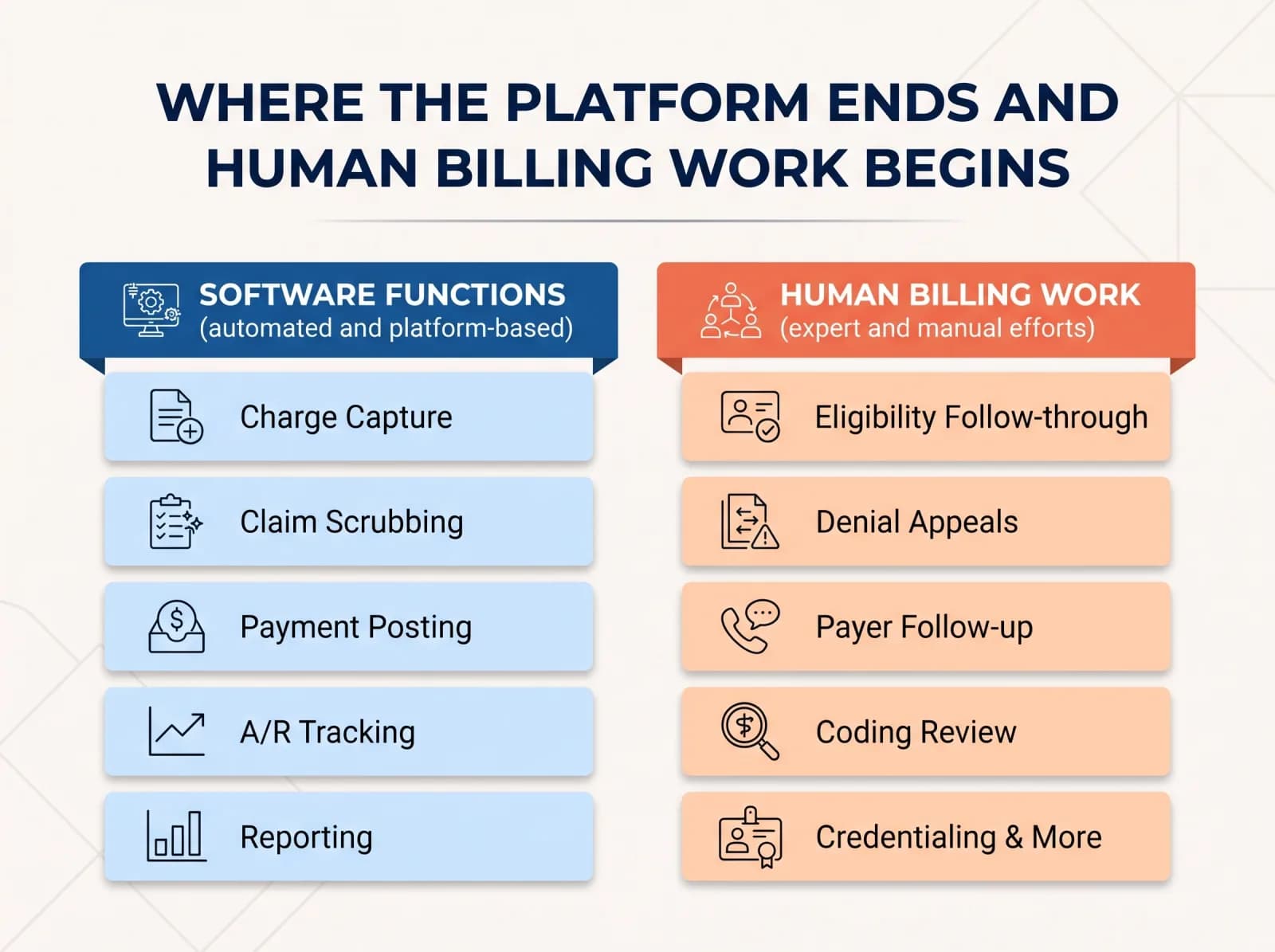
"Tebra billing" can mean two different things. For some practice managers it refers to the billing module inside the Tebra platform (which some practices may still refer to by a former product name). For others it means a billing service that works inside Tebra on the practice's behalf. If you are deciding how to staff and structure billing, separate those two meanings before you compare options. This guide does that, then walks through where the software's job ends, where human billing work begins, and how to evaluate anyone who claims Tebra experience.
What "Tebra billing" actually refers to
There are two distinct things under one label:
- The billing functions inside the Tebra platform. This is software: the tools your staff or a billing partner uses to create claims, post payments, and track accounts receivable.
- A billing service that operates in Tebra. This is people: a team that logs into your platform (or works alongside it) to do the recurring revenue cycle work the software alone does not perform.
Most confusion in the market comes from treating these as interchangeable. They are not. Software gives you a place to do the work; it does not do the follow-up, the denial investigation, or the judgment calls. Keep that distinction in mind for the rest of this article.
What the platform is designed to support
A practice management platform like Tebra is generally built to cover the mechanical layers of the billing workflow. The categories below are the ones to confirm in your own configuration rather than take on faith — feature sets change, and your contract and setup determine what you actually have:
- Charge capture — getting encounter data into a billable form.
- Claim creation and scrubbing — assembling claims and running edits before submission.
- Payment posting — recording payer and patient payments against claims.
- A/R tracking — aging reports and worklists that show what is outstanding.
- Reporting — dashboards and exports on volume, collections, and denials.
These are categories to verify, not confirmed claims about any specific Tebra release. Check Tebra's own documentation and your account team for what your edition includes and how each function is configured. Any payer rule, filing deadline, or coding question you encounter along the way should be verified against current official payer and regulatory guidance — not assumed from a template or a forum post.
Where the platform ends and human billing work begins
This is the part that decides whether your billing runs well. Software can flag a denial; it will not investigate it, draft the appeal, and follow up with the payer. The recurring work that still needs trained people includes:
- Eligibility verification follow-through — confirming coverage and benefits before the visit and resolving the exceptions a batch check surfaces.
- Denial investigation and appeals — reading the denial reason, gathering documentation, and pursuing the appeal within payer timelines.
- Payer follow-up — working aging buckets, calling on stalled claims, and documenting each touch.
- Coding review — checking that what was billed matches the documentation, with coding questions referred to qualified coders.
- Credentialing and contracting — keeping provider enrollment current so claims are payable at all.
- Reporting interpretation — turning a dashboard into a decision about what to fix next.
Any payer rule, filing deadline, or coding question you encounter along the way should be verified against current official payer and regulatory guidance — not assumed from a template or a forum post.
Three ways to staff billing in Tebra
Once you see the gap between software and work, the staffing question becomes clearer. There are three broad models:
In-house billing in Tebra
Your own staff runs the platform. This gives you direct control and visibility, but it depends on hiring, training, and coverage when someone is out. It tends to fit practices with enough volume to keep a dedicated biller busy and a manager who can supervise the work.
A Tebra-experienced billing service
An outside team works inside your Tebra instance while you keep ownership of the platform and data. This can suit practices that want to keep their system but hand off the recurring work. The key question is how cleanly responsibilities are divided.
Full revenue cycle outsourcing
The billing partner takes on the broader revenue cycle, often across their own process and tools. This can fit smaller or growing practices that do not want to staff billing at all. For a neutral comparison of the tradeoffs, see our guide to in-house vs. outsourced medical billing.
Match the model to your provider count, specialty complexity, and how much oversight you can realistically provide. A single-provider practice and a multi-provider group rarely land in the same place.
What to verify in a billing company that claims Tebra support
"We work in Tebra" is easy to say. These questions help separate real experience from a sales pitch:
- Access and ownership. How do they access the platform, and who owns the data and the account? You should retain ownership.
- Documentation. How are denial follow-up and payment posting recorded so you can see the work, not just the result?
- Reporting. What reports do they deliver, how often, and who walks you through them?
- Credentialing and eligibility. Who handles enrollment and benefits verification, and how are exceptions escalated?
- Transitions. How do they onboard from your current setup, and what happens if you part ways?
Our guide to choosing a medical billing company expands this into a fuller buyer's checklist.
Common friction points to check
These are general categories practices encounter with platform-based billing — things to inspect, not verified defects in any product:
- Configuration drift — settings and edits that no longer match how the practice actually bills.
- Unclear ownership — gaps where software and staff each assume the other handles a step.
- Denial backlog — denials logged but not worked, quietly aging.
- Reports that aren't acted on — dashboards reviewed but never turned into fixes.
What to do next
Start with a short internal audit: pull your current A/R aging and denial patterns, write down who does what at each step, and set a reporting cadence you will actually keep. That picture tells you whether to keep billing in-house, restructure it, or outsource. If you want a second set of eyes, our complete RCM services and denial management pages show how we work inside the systems a practice already uses. You can also contact us to discuss your situation.
Sources and verification
No external sources were supplied for this article. Feature, pricing, and payer details should be verified directly against Tebra's current documentation and official payer and regulatory guidance before you rely on them. Any specific behavior mentioned in this article should also be verified against Tebra documentation and current payer guidance before drawing conclusions.
Related articles.
 Medical Billing Vendor Selection
How to Evaluate Specialty Medical Billing Services: A Neutral Checklist
A neutral checklist for comparing specialty medical billing vendors on process, coverage, reporting and marketing claims, built for practices and groups that have outgrown one-biller oversight.
Read article Medical Billing Vendor Selection
Specialty Medical Billing Services: How to Evaluate a Partner for Your Practice Workflow
A practical guide to evaluating specialty medical billing partners on coding workflow, payer mix, denial handling, reporting, and contract terms.
Read article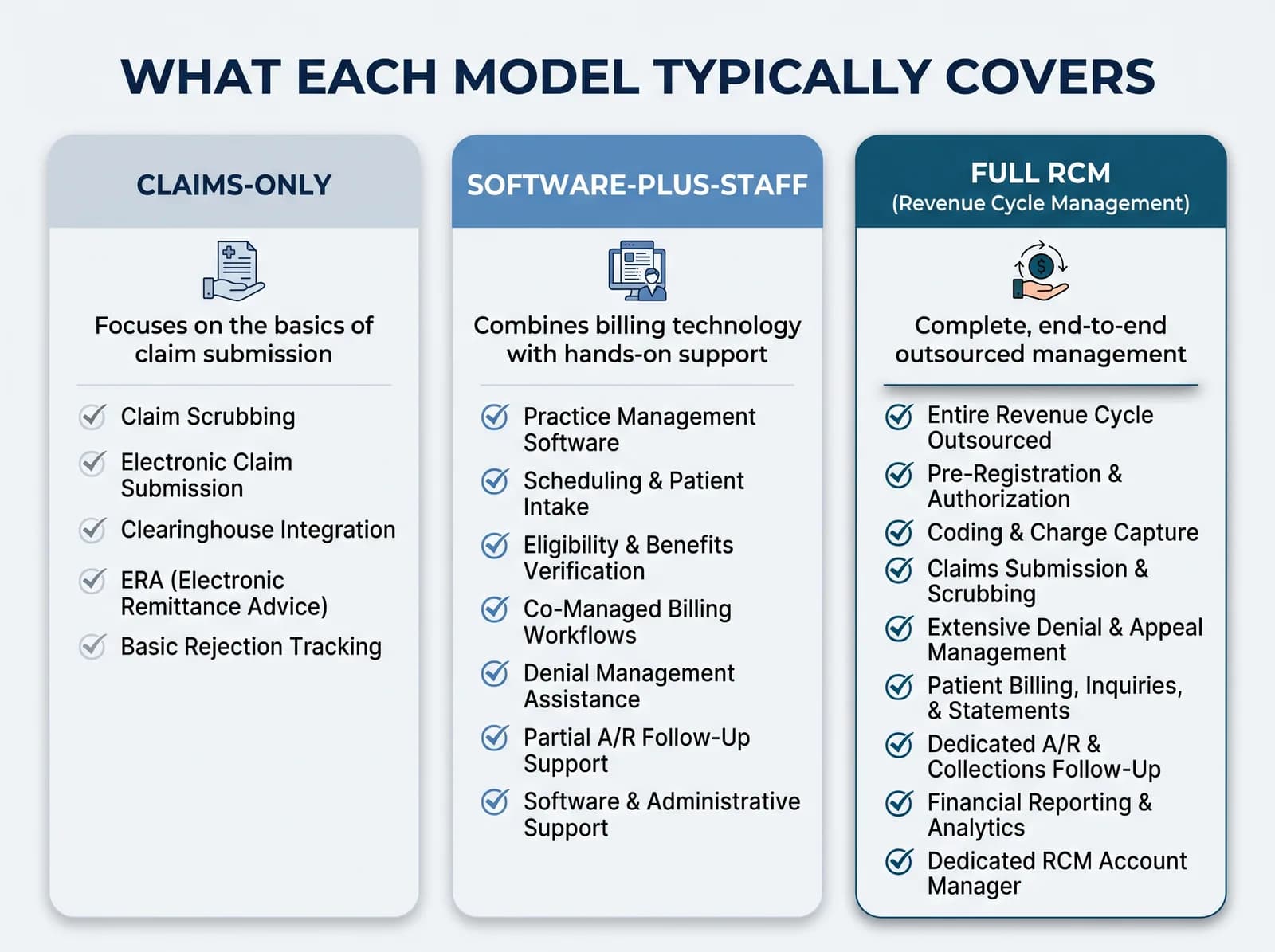 Medical Billing Vendor Selection
Billing Service Models Compared: Full RCM, Claims-Only and Software-Plus-Staff
A plain comparison of claims-only billing, full revenue cycle management and software-plus-staff, with scope tables and questions to ask before choosing a model for a growing practice.
Read article